Why Even a Small Site Feels Heavy From Abroad
A site that feels instant up close can feel slow to visitors in another country. Distance adds round trips, and a CDN moves part of the answer closer.
On this page
The message came through the contact form: the blog page felt slow, and the catalog took a moment before anything was clickable. I opened the same address from here, in Indonesia, and it appeared almost instantly. The server wasn’t busy, there was no traffic spike, the logs were clean. From my own chair, nothing needed fixing.
What differed wasn’t the site but the distance between the visitor and the machine that answers them. That visitor was loading it from Europe while the server sits in Singapore. Every byte has to make a long trip, back and forth, before the page can render. For a site with little content on it, the trip is what you feel, not the weight of the content itself.
The same site, at a different distance
Loading a page isn’t one request, it’s several conversations. The browser looks up the server’s IP address over DNS, agrees on a connection, sets up encryption, and only then asks for the page. Every step waits for an answer from the other side. The term is a round trip: one there-and-back that can’t be deleted, only shortened.
On a network, distance isn’t only kilometres. What counts is how many points a packet crosses and how long each of them spends weighing it. Long routes have more chances to queue. The result isn’t a “broken site” but small pauses that stack up: one for DNS, one for the connection, one for encryption, one for the HTML document, then more for images, fonts, and scripts. Up close the stack is invisible. From far away, the same stack feels like a heavy page.
That also explains why slow-site reports sound contradictory. “It’s fast where I am.” “It’s slow where I am.” Both can be true, and what usually differs isn’t the application code but the path in between.
The next question is fair enough: if distance is the problem, why not put the server near the visitor? Because a server isn’t only files. It holds an application, a database, login sessions, and data that must stay a single source of truth. Duplicating that across many locations is far harder than duplicating files that are identical for everyone. That gap is exactly where a CDN works: spreading what is easy to copy, without moving what isn’t.
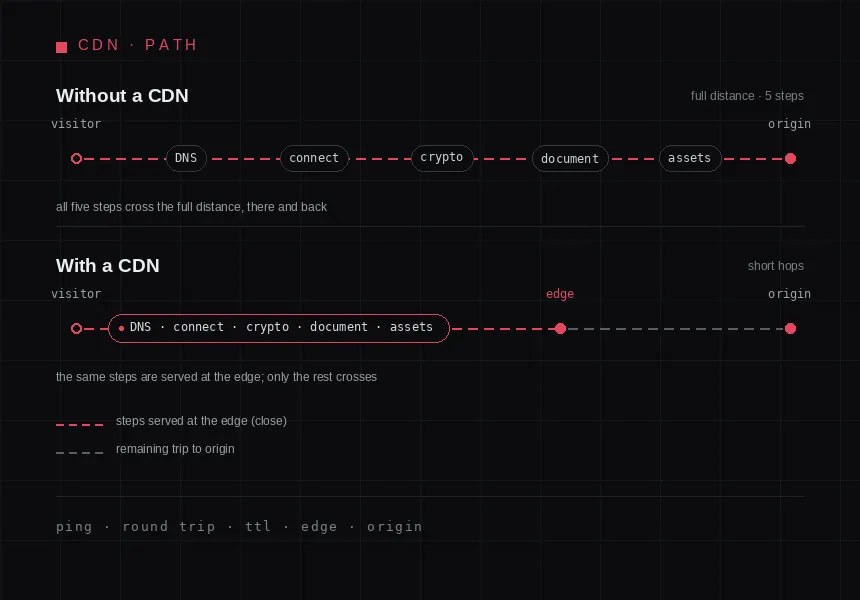
One page request, step by step: without an edge, every step covers the full distance.
What a CDN actually does
A CDN is a set of servers spread across many locations, answering requests on behalf of your main server. That main server, the one where the app, database, and logs run, is the origin. The scattered ones are the edge, sitting at the edge of the network, as close to the visitor as possible.
The idea is simple: if the content already sits near the visitor, it doesn’t have to travel all the way to the origin. The edge keeps a copy, the cache, and serves it directly. Copies don’t last forever; a time limit called TTL decides how long a copy is good enough before the edge checks the origin for something newer.
More than files move closer. The encrypted connection can end at the edge, so the visitor never does a cryptographic handshake with a distant server. Files identical for everyone, images, stylesheets, fonts, are the easiest to store and serve from there. What picks the edge is not DNS handing out a different address per visitor: a proxied record answers with Cloudflare’s anycast address, one same address for everybody, and the routing behind it carries the request to the nearest data centre. That’s why visitors in different cities can be served by different data centres without DNS having any say.
For pages that differ per visitor, the cache advantage shrinks fast, since there’s hardly anything to share. Cloudflare picks cacheable files by extension rather than by the content type the origin sends, and HTML isn’t cached by default; you have to switch that on yourself. One more thing that’s easy to miss: at the origin, what you see is usually Cloudflare’s IP, not the visitor’s. The real address rides along in CF-Connecting-IP, and X-Forwarded-For carries the proxy chain with it, but both help only if the origin reads them. Otherwise the log records the edge: on my server, every row in access.log still says 127.0.0.1.
What a CDN doesn’t fix
A CDN moves answers, not work. If a page is slow from a heavy database query, from server-side rendering, or from too much JavaScript in the visitor’s browser, a CDN touches none of it. Only the wait before the first byte changes; after the page lands, the rest is still your code’s problem.
Same for pages that are always fresh: carts, dashboards, search results. Caching barely helps there, and what’s left is a shorter path. Worth having, but rarely the slowest part.
A CDN can also add problems if installed carelessly: stale pages served over and over, changes that don’t appear right away, one more layer to inspect whenever something looks odd. For a team of one, that upkeep is real even when it never shows up on an invoice.
Then there’s the category that gets blamed by mistake: assets from someone else’s domain. Fonts, analytics scripts, comment widgets, and share buttons still come from their providers’ servers, however fast your own site is. If a page keeps stuttering once everything sits closer, the slow answer usually comes from a third party, not your origin. A CDN for those assets won’t fix it on its own.
Criteria for picking a light one
It isn’t about features but about how small a change buys the benefit. What I check first:
- There’s a point near your readers. Not the global location count, but a location in the region where readers actually are.
- The workflow barely changes. Ideally one DNS change, without moving the app or adding deploy steps.
- Cache control is clear. You can decide what’s stored and for how long without hours of documentation. TTL and headers can be set at the origin and at the edge, so confirm which one actually wins.
- It stays observable. Request logs, cache hit or miss, and where visitors come from still readable when a complaint arrives.
- Limits and cost are predictable. You know what happens when traffic rises, not just the entry price.
- It’s easy to remove. If it doesn’t fit, the site goes back to the origin without being taken apart.
The last one is forgotten most and reassures the most: a decision you can undo beats one that locks you in.
When you don’t need a CDN
Sometimes a CDN only adds a layer and fixes nothing:
- Readers are almost all in one region, and the server is in that same region. The distance you wanted to cut isn’t there.
- The site is static and already light. A few small files that already load in a reasonable time: the extra layer costs more to keep than it gives back.
- Pages are almost entirely personal. Nothing to share between visitors, nothing for the cache to work with.
- An internal site behind a VPN. Visitors are already close, and a public path only adds surface you have to guard.
- You don’t know yet why it’s slow. A CDN can hide the symptom instead of curing the cause. Measure first.
Weighing it before you decide
I don’t recommend a CDN for every site, and I don’t recommend it as the automatic answer to every “it’s slow” complaint either. Three questions help more than a product comparison.
First, where do the complaints come from, one region repeatedly, or scattered? Repeat complaints from one distant region almost always involve distance. Second, is the content mostly the same for every visitor? If so, there’s plenty you can store near them. Third, is the slow part the wait before the page appears, or what happens after? If it’s after, the problem sits in the browser and the code, not on the path.
If the answers point to distance and shareable content, a CDN makes sense. If they point to the origin or to the browser, your money and time are better spent there first.
Small sites don’t feel heavy because there’s a lot of code. Sometimes they’re just far away.