What Happens When a Server Runs Out of Memory
A full RAM does not kill a server outright. Linux drops caches, uses swap, then fires the OOM killer. This is the order it happens in.
The monitoring dashboard turns red, available drops to a few hundred megabytes, and then a process disappears with nothing clear left in the application log. From the outside the conclusion looks simple: RAM ran out, the server ran out of breath. In reality the Linux kernel has been making decisions long before that point is reached.
Linux does not let memory flow unchecked. When demand exceeds capacity, the kernel drops cache it can rebuild, moves rarely used pages to disk, and as a last resort kills a process so the system survives. What changes is only the order and the size of each intervention.
This article walks that sequence — from reading free -h correctly to finding the OOM evidence in the kernel log — so that when an application suddenly stops, the cause can be traced instead of guessed.
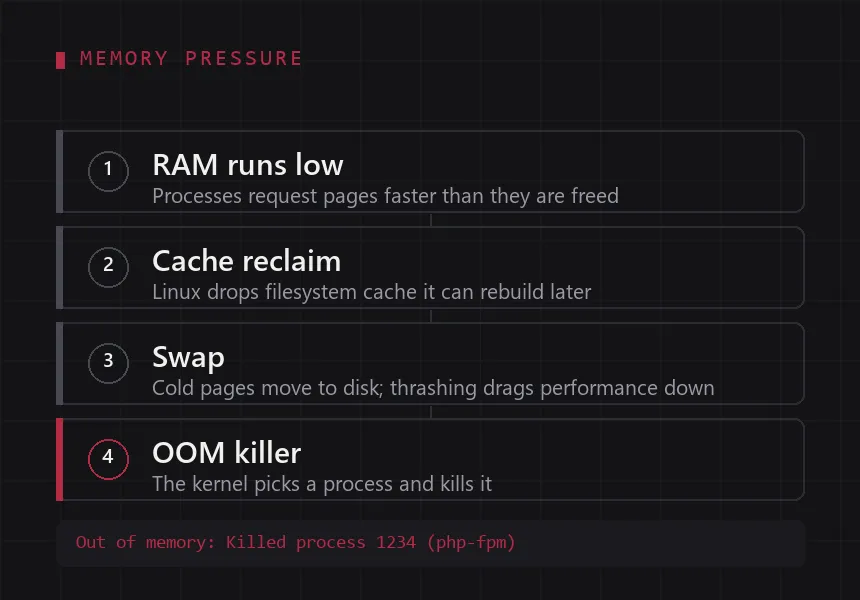
These four stages happen in order, not at once.
1. Reading memory usage correctly
RAM on a Linux server does more than run processes. The kernel fills whatever is left with filesystem cache and I/O buffers, because data already in memory does not have to be read from disk again. High memory usage is therefore not automatically a warning sign.
One command gives the summary:
$ free -h
               total        used        free      shared  buff/cache   available
Mem:            7.7Gi       3.2Gi       1.1Gi       120Mi       3.4Gi       4.1Gi
Swap:           2.0Gi       128Mi       1.9Gi
The columns worth reading:
total— installed RAM.used— memory currently held by processes.free— memory that is completely empty.buff/cache— memory used for filesystem cache and I/O buffers; most of it can be released when needed.available— an estimate of what can still be handed to new processes without heavy swapping.
For the question “does this server still have room?”, available is far more useful than free. A healthy server with a small free and a large available is normal, not alarming.
2. When RAM runs low
As demand grows, the kernel enters reclaim. Its first targets are memory it can recover without losing data: page cache, inode and dentry cache, and pages no process has touched for a while.
The rough order:
- Filesystem cache is dropped. The content still exists on disk, it just has to be read again later.
- Cold anonymous pages move to swap, if swap exists.
- New allocations stall briefly while the kernel waits for other processes to release memory.
As long as there is something left to reclaim, applications mostly feel a small slowdown. Real trouble starts when reclaim is no longer enough: allocations take longer, request latency climbs, and logs begin to mention allocation failures.
3. Swap is not extra RAM
Swap is disk space the kernel uses to hold memory pages when RAM is under pressure. It can be a partition or a file, and it makes a server more resilient to bursts of usage.
But swap is not extra RAM. A server with 4 GB of RAM and 2 GB of swap does not become a 6 GB server. Disk read and write speed, even on NVMe, sits far below RAM. When the system moves pages back and forth too often, performance collapses — a condition known as thrashing.
Watch swap activity with:
swapon --show
vmstat 1
In the vmstat output, two columns matter:
si— memory read from swap per second.so— memory written to swap per second.
Numbers that stay high, especially alongside a slowdown, indicate serious memory pressure. Swap that is lightly used and stable is fine; swap that keeps moving is not.
4. The OOM killer: when the kernel has to choose
If RAM and swap are both exhausted, the kernel cannot keep waiting. At that point the Out Of Memory killer runs: it picks a process and kills it so the machine as a whole stays usable. It is a blunt decision, but better than a system frozen because nothing can be allocated.
The victim is not always the largest process. The kernel scores each process with oom_score — the higher the score, the likelier it is to be killed — influenced by factors such as memory used and how long the process has been running.
cat /proc/<PID>/oom_score
cat /proc/<PID>/oom_score_adj
oom_score_adj is the value an administrator can tune, from -1000 (never chosen) to 1000 (most likely to be chosen). It is useful to protect critical processes, a database for example, from being the first casualty.
5. Confirming whether a server has hit OOM
An application that dies abruptly with nothing in its own log is often blamed on a bug. In fact the process may have been stopped from outside, and the evidence lives in the kernel log:
sudo dmesg -T | grep -i -E 'out of memory|oom|killed process'sudo journalctl -k | grep -i -E 'out of memory|oom|killed process'The line to look for looks roughly like this:
Out of memory: Killed process 1234 (php-fpm) total-vm:2048000kB, anon-rss:512000kBThat message explains what was previously mysterious: the php-fpm worker was killed by the kernel, and Nginx returned 502 because no process was left to serve the request. The application configuration never changed — the memory did.
For services inside a container, the same event leaves a trace in the exit code. A process killed by the OOM killer receives SIGKILL and exits with code 137.
6. Monitoring before the incident
A single snapshot rarely tells much. What helps is the pattern: which hours usage climbs, which process keeps growing, and whether it comes back down when work finishes.
A few commands cover most cases:
free -h— RAM and swap summary.toporhtop— running processes and their resource use, refreshed periodically.ps aux --sort=-%mem | head -10— the ten processes with the largest memory footprint.vmstat 1— memory, swap, process, and I/O activity per second.
A better habit: ship these metrics to monitoring, then alert on the trend of available and on si/so, not on a single usage threshold sampled at one moment.
7. Reducing the risk of running out of memory
There is no configuration that fits every server. There are only practices that generally shrink the odds:
-
Size the worker count. PHP-FPM, Node.js, and queue workers multiply the memory needed per process. Adding workers without accounting for the memory ceiling is a fast route to OOM.
-
Cap container memory. Docker can limit each service, so one application does not consume the whole host:
services:
  app:
    image: nginx:alpine
    mem_limit: 512m
Note: a limit that is too small is dangerous as well. The container will be OOM-killed even while the host has room, so the number has to follow the application’s real need instead of being made as small as possible.
-
Treat swap as a safety net. Swap buys time to react during a burst; it does not replace adding RAM.
-
Look for leaks. Usage that climbs forever and never comes back down, especially after traffic spikes, is usually a bug or an unbounded cache rather than a capacity problem.
-
Decide what must not be sacrificed. Tune
oom_score_adjfor the most important services, and make sure the others can be restarted safely. -
Add RAM when it is genuinely needed. If optimisation is done and demand keeps growing, more capacity is the honest answer.
Closing
Running out of memory does not kill a server outright. Linux goes through several stages first: dropping cache, using swap, then killing a process through the OOM killer. Understanding those stages changes how an incident reads — from “the server died suddenly” to “this process was killed by the kernel, and there is a reason”.
The skill an administrator actually needs is not memorising the commands above, but knowing where to look when an application stops without explanation: available and swap activity in vmstat, then the kernel log for the OOM trace.
Reference: Linux Kernel — Memory Management, Out of Memory Handling, free(1), and vmstat(8) — official documentation.